In April 2025, Microsoft launched the Fabric Data Agent, an innovative tool that allows users to create and configure natural language conversational agents/chatbots to interact with data stored in Fabric. Although still in preview, the results so far have been very promising.
Key Features
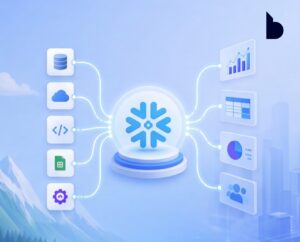
The Fabric Data Agent enables any team member to have conversations about data stored in Fabric OneLake, without writing a single line of code. This is made possible through the configuration of data sources, which can include structured data or semantic models. Users can select source tables, customize responses, and the AI handles the necessary translations.
For example:
• Natural language queries over a semantic model are translated into DAX.

- Queries over a relational database are translated into SQL.
- Natural language queries over KQL databases are translated into KQL (NL2KQL).
It’s important to note that the Fabric Data Agent only generates read-only queries in SQL, DAX, or KQL — it does not support create, update, or delete operations.
In this context, the avatar developed by Bravent plays a central role as an interactive information point, offering a conversational experience that is both accessible and useful for visitors. Its main features include:
- Greeting and guiding attendees through the different areas of the center.
- Explaining ongoing activities and available resources such as workshops, networking areas, innovation labs, and tech demos.
- Answering questions in real time through natural language processing, thanks to the integration of conversational AI technologies.
Interaction Process
The Fabric Data Agent processes user questions, identifies the most relevant data source (e.g., Lakehouse, Warehouse, Power BI datasets, or KQL databases), and invokes the appropriate tool to generate, validate, and run the query. The selected tool generates a query based on the schema, metadata, and provided context, which is then executed by the underlying agent. Query validation ensures correct structure and compliance with security protocols and RAI policies.
This approach allows users to interact with data using natural language, while the agent handles the complexities of generating, validating, and executing queries — all without needing to write SQL, DAX, or KQL.
Instructions and Customization
The Fabric Data Agent accepts instructions and rules to guide its behavior, including example responses. This is similar to the “system prompt” in Azure OpenAI API calls. Instructions can include:
- Planning rules for handling different types of question.
- Data source selection based on the topic
- Example queries
- Consistent terminology across data sources
- Tone, style, and formatting of responses
Prerequisites and Setup
To use the Fabric Data Agent, you need a paid Fabric capacity (F2 or higher) and at least one of the following: a warehouse, a lakehouse, one or more Power BI semantic models, or a KQL database with data.
Agents can be configured with up to five data sources in any combination (lakehouses, warehouses, KQL databases, and Power BI semantic models). For optimal performance, it’s recommended to work with 25 or fewer selected tables across all sources.
Additional context, such as example queries or custom instructions, can be added to improve accuracy.
Differences from Fabric Copilots
While both Fabric Data Agents and Fabric Copilots use generative AI to process and reason over data, there are key differences in functionality and use cases:
- Configuration flexibility: Data Agents are highly customizable, allowing for tailored behavior in specific scenarios. Fabric Copilots, on the other hand, are preconfigured and less customizable.
- Scope and use case: Fabric Copilots are designed for tasks within Microsoft Fabric, like notebook code generation or data storage queries. Data Agents are standalone artifacts and can be integrated with external systems such as Microsoft Copilot Studio, Azure AI Foundry, Microsoft Teams, or other tools beyond Fabric.
Conclusion
The Fabric Data Agent marks a major advancement in how users can interact with their data using natural language. Its ability to generate, validate, and execute queries without code, combined with deep customization options, makes it a powerful tool to enhance data management efficiency and effectiveness.
Want to know how to apply AI in your company?
📩 Request a free advisory session with our experts.
🔗 Visit www.bravent.com to learn more about our solutions.
For more details, you can contact us at Info@bravent.net