Few companies deploy an AI agent on a brand-new system. They place it on top of the ERP that handles invoicing, the CRM that supports sales, and applications that have been running for years. The demo looks great because the agent only reads data. The real questions appear when the agent needs to write.
Who allows it to issue a refund? Up to what amount? What happens if it issues the same refund twice? How will you know afterward what changed?
The answer has little to do with the AI model and a lot to do with architecture. It depends on where you place the boundary between the agent and your systems, and what decisions that boundary is responsible for making.
Let’s explore this using .NET code and a simple scenario: a customer service agent that retrieves order information and issues refunds in an ERP system.
The Agent Is Just Another API Client and Not Entirely Trustworthy
A traditional dependency usually fails loudly: an HTTP 500 error or a request timeout. A model can fail silently. It may return a perfectly valid JSON payload containing the wrong order, an amount expressed in cents instead of euros, or a customer that does not exist. It passes schema validation and reaches your systems looking perfectly legitimate.
The model is not always to blame. If the agent reads an email, a review, or a web page, that content may contain hidden instructions. The model may follow them. This is known as indirect prompt injection.
That is why an agent should be treated like an external client consuming your API, one that you do not fully trust. Everything it sends should be validated. Everything it can do should be explicitly authorized.
Tools Should Represent Use Cases, Not Operations
The temptation is to expose the entire internal API as agent tools. It is easy to do. For example, Azure API Management can convert REST API operations into MCP tools directly from the portal.
MCP (Model Context Protocol) is the open standard that allows agents to discover and invoke tools. But if an agent sees two hundred operations, it must choose among two hundred operations. A single mistake, or a prompt injection attack, may lead to the wrong choice.
OWASP calls this excessive agency and includes it in its Top 10 risks for LLM applications. It identifies three root causes:
- Too many functions
- Too many permissions
- Too much autonomy
The first is solved through design: expose only a small number of tools aligned with the agent’s purpose.
The second is solved through identity and permissions per agent.
The third requires limits and human approval.
For a customer service scenario, two tools are enough:
- Retrieve an order
- Issue a refund
If you use API Management to generate tools automatically, carefully select which operations are exposed. Only expose those that represent actual business use cases.
Each tool should call an application-layer use case, never the database and never the internal API directly.
This effectively acts as an Anti-Corruption Layer, the pattern introduced by Eric Evans in Domain-Driven Design. It translates between systems that model the business differently, preventing one from polluting the design of the other.
Because these two systems do not deserve the same level of trust, Microsoft’s guidance recommends validating incoming data at this boundary. The agent speaks natural language and produces approximate JSON. Your domain speaks rules that cannot be approximate.
The Boundary in Code
In our example, a customer service agent can issue refunds of up to €200 per order without approval.
Using the official MCP SDK for C#, maintained in collaboration with Microsoft, the refund tool is surprisingly small:
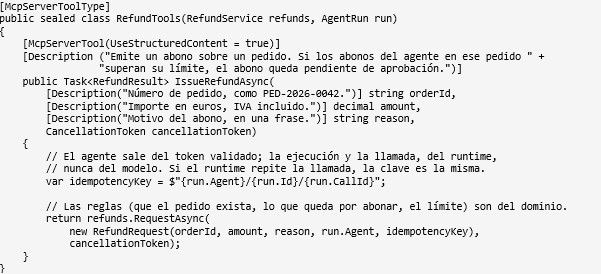
The interesting part is what this code doesn’t do:
- It doesn’t make decisions. It translates the call into a use case and passes it to the domain. The domain checks that the order exists, the amount doesn’t exceed the remaining refundable balance, and the agent stays within its limit. A rule written in a prompt is a suggestion; a rule enforced by the domain is a guarantee.
- It doesn’t let the model invent the idempotency key. This key prevents a retry from issuing the same refund twice. There’s no guarantee that the model will reuse the same key on every attempt. Instead, the agent runtime — the code that executes the agent and calls its tools — generates a key for each call, outside the arguments visible to the model. If the runtime retries the call, the domain recognizes the key and returns the same response. If the model requests the refund again, the key changes, and the domain’s business rules prevent an unintended duplicate.
- It doesn’t throw an error when the limit is exceeded. The MCP specification requires execution errors to be returned to the model so it can correct the request and retry with different parameters. If exceeding the limit were treated as an error, the model might try to work around it by splitting the refund: two refunds of €150 instead of one for €300.That’s why the tool returns an explicit result — issued, pending approval, or rejected, along with the reason — that the agent can explain to the customer. The limit also takes into account the total amount the agent has already refunded for that order, so splitting the amount doesn’t work either.
We’ve tested this with version 2.3.0 of the SDK. When a call is repeated, the response is the same; and a second refund of €150 on the same order remains pending approval.
Every Agent Needs Its Own Identity and Permissions
If all agents use the same credentials, any of them can do whatever the most privileged agent can do. And the logs will only show that it was “the integration.”
Every agent needs its own identity. Microsoft Entra Agent ID provides one and is available to all Microsoft Entra customers. The protections already available for users and applications — conditional access, risk detection, sign-in logs, and auditing — extend to agents through Microsoft Agent 365.
Microsoft Agent 365 is included in Microsoft 365 E7 and is available as an add-on for Microsoft E5, A5, and Business Premium.
With its own identity, each agent has its own permissions. The sales agent can retrieve orders but cannot issue refunds. And because the domain knows which agent is requesting each refund, it can enforce a specific limit for each one: the customer service agent can issue refunds of up to €200 without approval.
When an agent acts on behalf of a user, OWASP recommends operating within that user’s context and granting only the minimum permissions required.
In front of a custom MCP server, such as the one in our example, Azure API Management acts as a gateway. It validates the Microsoft Entra ID token, applies quotas and rate limits, and logs every call without changing the tools’ code.
The server, in turn, only accepts calls that come through the gateway.
It’s the same principle we explored in our article on AI agent governance for model consumption: usage limits belong at the gateway, rather than being scattered across individual applications. Business rules, such as the amount of a refund, belong in the domain.
Audit What Changed, Not What the Model Said
What matters is what actually changed in your systems: which refund was issued, for what amount, against which order, by which agent, during which execution, and who approved it.
That record doesn’t come from the chat. The application layer writes it as a business event, in the same transaction in which it records its decision. The call to the ERP happens afterward, using the same idempotency key.
This allows you to answer an auditor’s questions without reconstructing conversations and to correct anything that went wrong.
An agent execution isn’t a single transaction that can simply be rolled back. If the agent issued three refunds and one was unnecessary, the record tells you exactly which one and which key was used.
The MCP specification already requires client applications to log tool usage, but this business record is the authoritative one.
How to Get Started Without Putting Existing Systems at Risk
You don’t need to open everything up on day one. A better approach is to move forward in four steps:
- Read-only access. The agent retrieves orders and proposes refunds. A person issues them.
- One write tool, with approval required for everything. The agent initiates refunds, but each one remains pending until someone reviews it.
- Measure the results. Track how many proposals are approved without changes, how many are rejected, and why.
- Increase limits where the data justifies it. Small refunds can be issued without approval; larger ones still require it.
Each step can be rolled back without changing the ERP, because you control the boundary.
Let’s Talk
At Bravent, we help organizations bring AI agents into systems that are already in production. We work with you to select the first use case, design the boundary — tools, identities, gateway, and auditing — and validate it through a pilot.
Want to explore what an AI agent could do with your ERP or CRM without handing over the keys? Get in touch at info@bravent.net.